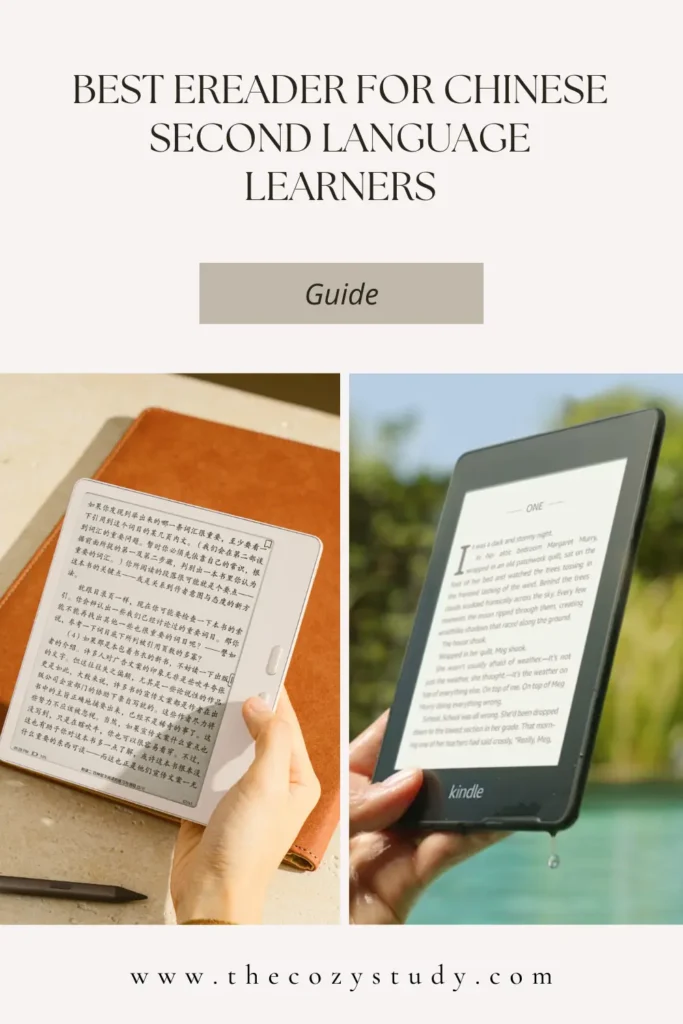
E-reader devices, also known as e-ink readers (阅读器), are devices made with an e-ink screen which gives a paper-like experience. They are designed for extended reading sessions, are easy on the eyes, and perform better in bright light than LCD tablets like iPads.
They make great companions for avid readers and those who want a distraction-free study tool.
There are many devices on the market, but Chinese learners have different requirements compared to other users who are only looking to read in their native language.
This post will discuss what an e-ink screen is, its advantages and disadvantages, and talk about the best device for you as a Chinese language learner.
What’s an e-ink screen?
E-ink screens are a type of screen that appears paper-like. This is achieved by rearranging tiny pigment particles to form text and images.
E-ink vs LCD screens
Comparisons are often made between e-ink and LCD screens. LCD screens are the screens you find on your phone and tablets. But I feel it’s unfair to compare them as the two screen types are used on devices for different purposes.
That said, e-ink technology has its advantages and drawbacks.
Some advantages of an e-ink screen include low power consumption, a lightweight design, and excellent visibility in bright light without glare. Their paper-like display is also gentler on the eyes, making them ideal for long reading sessions without causing fatigue.
A major disadvantage of an e-ink screen is its slow refresh rate. Due to the physical movement of the particles, frame rates are much lower than those of LCD devices.
Another drawback is colours. Many new devices have coloured screens, but the colours are dull (like a newspaper or a really old magazine), and the screens appear a little fuzzy and grainy compared to a black-and-white e-ink screen.
Generally, e-ink devices have limited use, not great for watching videos or scrolling through social media, but perfect for reading, drawing and note-taking.
On the other hand, devices with LCD screens offer bright, crystal-clear colours and super-fast refresh rates, making them brilliant for all types of entertainment.
Are eReaders/e-ink devices distraction-free?
Devices that run their own operating system with their own ecosystem, such as Amazon Kindle and Kobo, are completely distraction-free. The sole purpose of these devices is to provide a paper-like experience in digital form. With the limited available features, you essentially can’t do much on these devices besides read and take notes.
Devices that run an open Android operating system, meaning you’re free to install any Android app, are as distraction-free as you want them to be. That said, e-ink Android devices are limited by frame rate and speed, so most apps don’t run well on them, and the experience is generally terrible. You’re not likely to want to use apps such as YouTube or TikTok on those devices. Given their limitations, you can consider them distraction-free as well.
eReaders/e-ink devices for Chinese
As e-ink devices excel at reading, drawing, and note-taking, they make a great companion for your distraction-free Chinese studies.
There is a wide range of devices available, including Amazon Kindle, Kobo, reMarkable, and Boox. It’s difficult to know which one is suitable for your learning needs, so we’re going to discuss the best options for you.
Amazon Kindle and Kobo
Amazon Kindle and Kobo are the most widely available and affordable devices on the market, with excellent build quality. The battery life of the latest Amazon Kindle Paperwhite is among the best on the market, lasting up to 12 weeks on a single charge.
It’s easy to get help and find information on these devices, with plenty of videos, blog posts, and comparison information. You might even be able to test them out in person at a local electronics store.
All Amazon and Kobo eReaders run a custom operating system, where installing Android apps is not possible at all. eBooks can be purchased directly at their respective stores, and sideloading of documents and books from other sources is also possible.
Amazon Kindles
All models of Amazon Kindle (i.e. Paperwhite, Colorsoft) support multiple languages, including Chinese (traditional and simplified), but font options are limited. Additional dictionaries, including a Chinese→English one, can be downloaded directly from the device’s dictionary section.
From personal experience with the Amazon Kindle Paperwhite, when looking up words in the built-in pop-up dictionary, selecting a word of two or more characters is clunky—it requires dragging the cursor across the word, and most of the time it doesn’t work properly. Amazon Kindles don’t have built-in support for Chinese word recognition.
Kobos
All Kobo models (e.g., Clara, Libra) support multiple languages, including Chinese (traditional and simplified); however, they are not shipped with a simplified Chinese font. Kobos does offer the option to install custom fonts.
Out of the box, Kobo devices do not offer a Chinese→Chinese or Chinese→English dictionary, and installing a custom Chinese→English dictionary is very difficult; it requires modifying the Japanese→English dictionary. It’s also only possible to look up one character at a time; looking up a word (two or more characters) will require using the drag feature to highlight the whole word.
The Chinese experience can be improved by installing KOReader, a custom reader. KOReader works great with Chinese word selection and custom dictionaries.
Are these eReaders for you?
If you plan to read books from their respective stores, don’t need to look up words, and you’re already very advanced/close to a native level, then they are a brilliant, affordable option. Be aware of the availability of Chinese books in your region.
I’ve had a few different Amazon Kindles and never had any problems with them. If it weren’t for Chinese content, my Amazon Kindle Paperwhite or one of the Kobo devices would be my go-to eReader.
If you already have one of these devices, consider options to improve the experience for reading Chinese content before considering other options. Buying a new device is an expensive investment.
Boox and other Android devices
Boox eReader, also known as Onyx Boox in some regions, is a brand of Android e-ink devices created and manufactured by the Chinese company, Boox (文石).
Advantages
Their devices run an open Android operating system. The open system lets you install any Android app on the device, including Pleco, Kindle, Kobo, and Google Books! You’re not tied to a single ecosystem.
As a Chinese learner, using apps such as Pleco and DuChinese on an e-ink screen for long reading sessions is a game-changer during the early stages of learning Chinese.
Additionally, the built-in reader on Boox devices offers excellent features for reading Chinese, including conversion between traditional and simplified. My personal favourite features for Chinese are word recognition and text-file support — more on this below.
Disadvantages
They are, however, slightly more expensive than their non-Android counterparts and are not available in all regions. The international devices do not have their own digital bookstore. Books will need to be sourced from other places.
Although you can run apps from different ecosystems, such as Kindle, Kobo, and Google Books, these apps are not optimised for e-ink devices, so the experience won’t be the same as using their dedicated device.
Some Chinese services, including 微信读书 and Bilibili Manhua, have partnered with Android e-reader manufacturers to create a lightweight e-ink edition of their apps. These editions have reduced features, no animation, and a simplified page-turn mechanism to improve the experience on e-ink devices.
This range of e-ink apps is limited. Due to the lower refresh rates, some full-featured Android apps can struggle to run smoothly on these slower devices, particularly on older models.
Other Android devices
There are other manufacturers of Android devices, including Bigme and PocketBook. Unfortunately, I don’t have experience with them, so I’m not able to comment much. The prices of their devices appear to be lower than Boox’s, so it’s worth doing your own research.
Best for Chinese
Without a doubt, the best devices for Chinese are those running the open Android operating system. I’ve used Boox devices for over 4 years and have had three different models from their Leaf range.
Beyond the open operating system, which allows you to install apps such as Pleco, Readibu, and DuChinese, the system also offers excellent support for Chinese — more on this below.
More about Boox Devices
Boox offers regional editions, which vary widely. In recent years, the available range has begun to diverge significantly with very different models.
China vs International Range
In addition to the physical range and prices differing quite a bit, there are some common differences among the Chinese, international, and regional editions.
Note: Hong Kong, Taiwan, and Macau only offer the international range.
A major difference across the whole range is the inclusion or lack of Google services and the Google Play Store. These are not pre-installed on devices from China (other regional versions may also be missing them) and may be tricky to install. I haven’t managed to get Google Play working on my Boox Leaf 5; if you know how, please leave a comment below and let me know.
A second major difference is the Boox app store. The China edition is connected to the Boox Chinese app store, which includes the most popular reading services — both the e-ink and the full version. Since Chinese apps are often unavailable on Google Play, it is more convenient to download them from the Boox app store. Sourcing the APKs, particularly the uncommon e-ink version, can be challenging.
Finally, the reading data (i.e. reading progress and stats) sync is only available with an Onyx/Boox account, which is region-locked. The China editions of the devices can only sync to the Boox CN server, whereas the international edition offers the option to sync to either the US or EU servers. If you want to sync reading progress, ensure the devices are from the same region. Other data, such as notes and annotations, can be synced to third-party servers, including Google Drive, OneDrive, and Dropbox.
More support for Chinese content
Support for the Chinese written language is not something that is special, as other devices also support Chinese. But Boox devices offer more features tailored to consuming Chinese content.
Note: These features all exist in both international and China models.
Word recognition
One of my favourite features of the built-in reader is that it can recognise words when using the pop-up dictionary. What I mean by this is that you can long-press on any of the characters of the word (e.g. you pressed on the 名 of 大名鼎鼎), and it’ll select the whole word (大名鼎鼎) to look up in the dictionary.
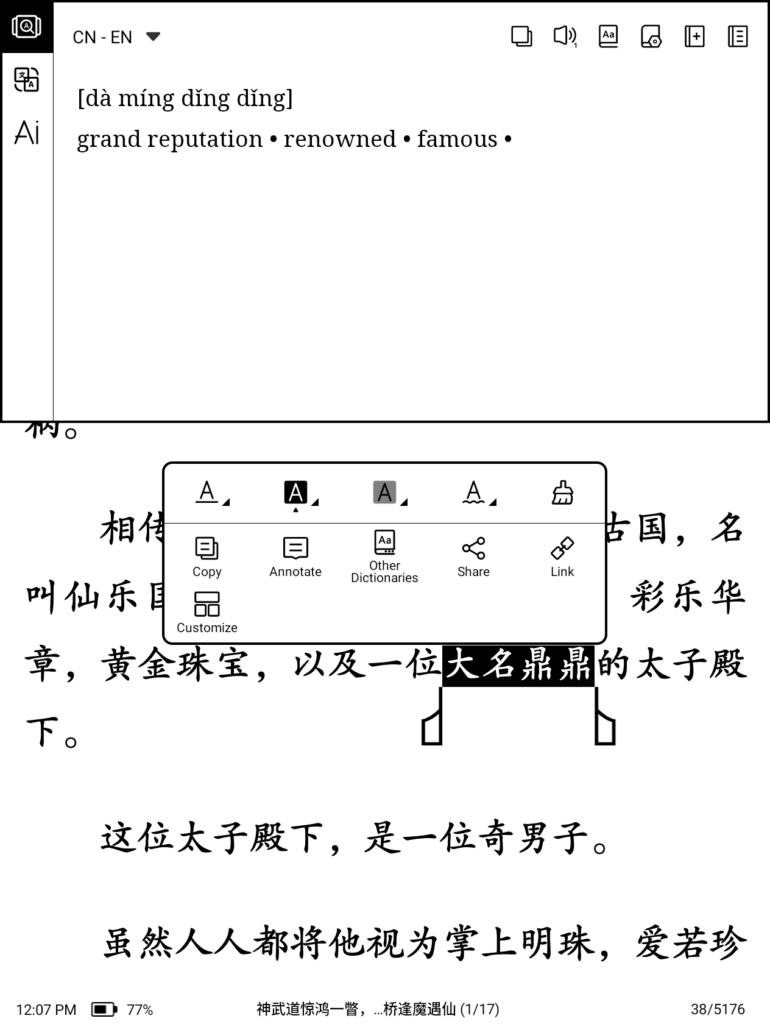
It may seem trivial, but believe me, this isn’t available on the Amazon Kindle. With the Amazon Kindle, it’ll only recognise the single character you pressed on, or you need to drag and select the whole word — it’s very clunky and difficult when you need to look up many words.
Txt support
All eReaders support reading .txt files, but Boox also supports formatted .txt files.
When you open .txt files on most devices, they will read these files as one big piece of text, without any segmentation.
However, if the file is formatted in a particular way, Boox will segment it into chapters, with nicely spaced paragraphs and treat it as a well-formatted ebook.
Chinese webnovels and eBooks are often found in .txt format, with each chapter label beginning with 第1章, 第2章, 第3章. Boox devices will acknowledge these headings and segment them into chapters, giving you a table of contents that you can use for chapter navigation.
Seems trivial, but it saves you from converting .txt files into .epubs — like you’ll need to for other devices. It also helps when you need to create your own file to read on your Boox device. It’s much simpler to create .txt files with the correct heading than to create an .epub file.
Other great features
My favourite non-language-related feature of the Boox devices is BOOXDrop. It’s an amazing feature that lets you transfer and manage files over Wi-Fi.
Once the Boox device is connected to a wifi network, the BOOXDrop app provides an IP address that any device (a laptop, computer, tablet, or phone) on the same network can access.
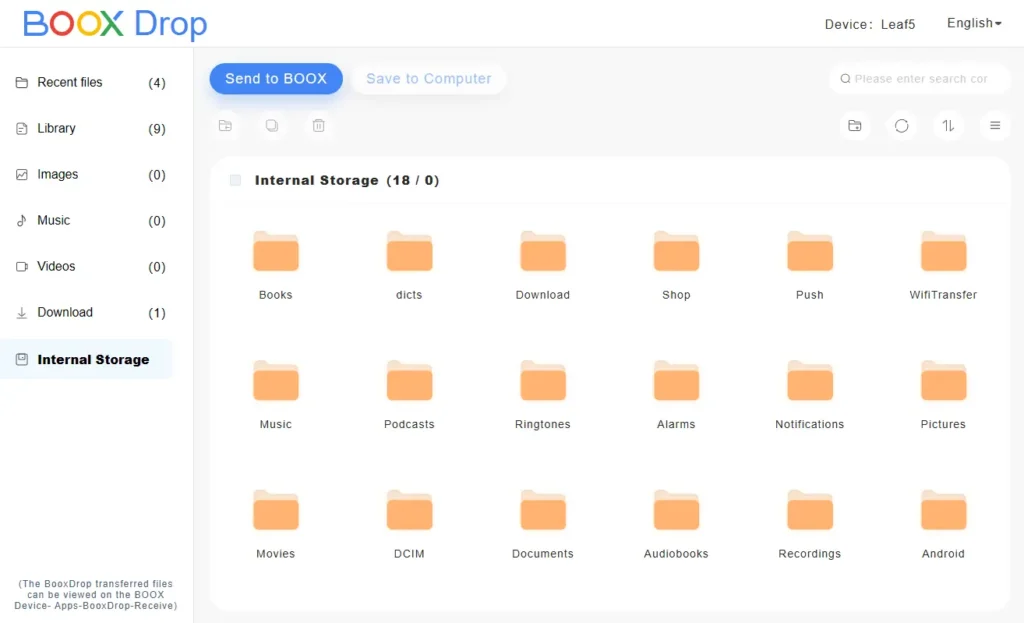
Managing any files on the device can all be done via the management tool at that IP address. It’s great for transferring books, dictionaries, images, APKs and fonts.
Which Boox device to buy?
You’ve decided to invest in one of these devices for your Chinese learning and for the future, when you’ll be consuming native content, but there are so many to choose from that you don’t know which to pick.
If your focus and goals are to read Chinese content and use Chinese webnovel apps, then a device from the 7-inch Leaf/Go or phone-size Palma/P range is perfect for you. The built-in reader works brilliantly out of the box for Chinese content, and you can also install other apps such as Pleco, Readibu, and DuChinese.
For the 7-inch range, it’ll be the Boox Leaf 5/5C/5+ range (China editions), the Boox Go 7, and the Boox Go 7 Colour (Gen 2) (international editions).
The Palma series (international) or P series (China) is also a great option if you want a phone-sized, ultra-portable device. The devices in the Palma series are also higher-spec than the Leaf/Go series, so apps run smoother on them.
Note: Boox Palma and Boox Go 6/Poke 6 are shipped with Android 11, which is quite old and out of support and cannot be upgraded (Boox does not support this). Over time, many apps will not work on this version. Unless, you really want a smaller device, I would recommend you consider a device with newer version of Android.
The larger devices are perfect if you’re looking for a device you can use to draw, write, and run multiple apps at the same time, essentially a tablet with a paper-like screen. The larger screen is also good for reading informational PDFs and textbooks. Bear in mind that they cost a lot more, are not very portable, and will be heavy to hold for extended periods.
Their devices have storage ranging from 64GB to 128GB, and given the limited capabilities (i.e., you won’t be installing games on these devices), 64GB is plenty of space! Don’t buy a bigger or more expensive device just for storage, since you’re unlikely to use it. They all come with an SD card slot, so there’s always the option to expand when you need it.
Black & White or Colour
Coloured devices have become popular since 2024, with most brands offering both versions. The coloured version is also more expensive.
If both the black & white and coloured screens deliver the same experience, it’s almost a no-brainer to go with the coloured version. Who doesn’t want to be pretty colours, right? However, to provide the colours, there’s a significant sacrifice in screen quality.
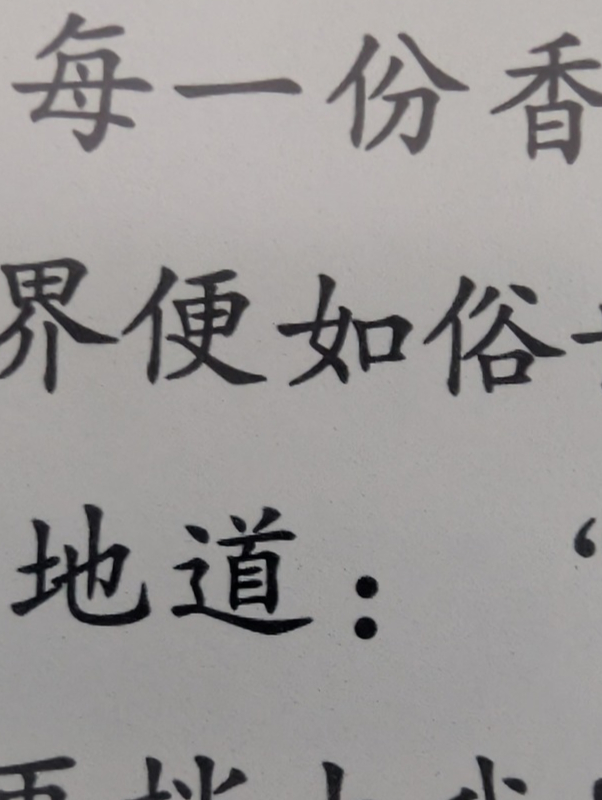
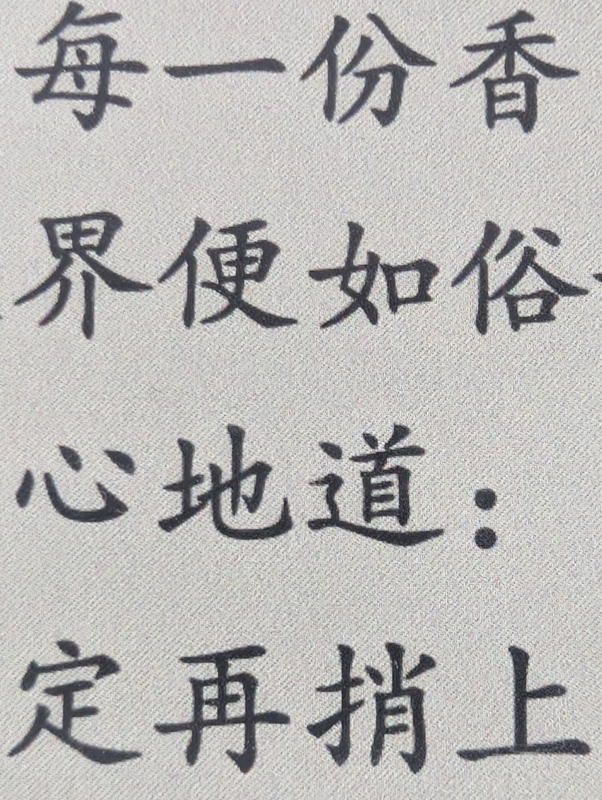
In short, a coloured layer is placed on top of the black & white e-ink screen, making the screen greyer and darker. There’s also a grainy effect, which is very visible when looking at whites or light colours.
Below is a close-up of text on a black & white and coloured screen. You can see that the coloured screen has a slightly grainy speckled effect. I feel it’s still quite visible even when looking at the screen from a normal reading distance.
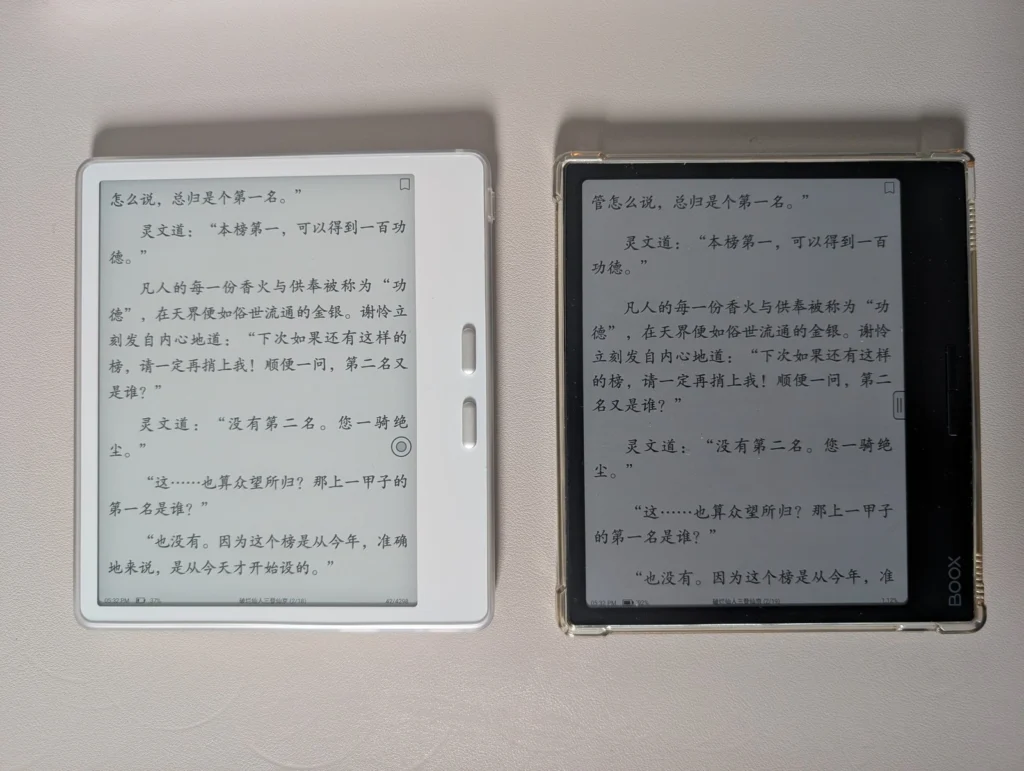
Below is a photo of the Boox Leaf 5 (black and white) next to the Boox Leaf 3C (coloured). The front lights are completely off on both devices. You can see that the coloured screen is significantly darker than the black-and-white screen.
On the coloured screen, the front light must always be on for the text to be readable, resulting in faster battery drain. Alternatively, an additional light source, like a desk lamp, is needed.
Ghosting (where the previous page remains slightly visible after a page turn) is stronger on coloured devices when consuming coloured content and requires a full-page refresh every 2-3 page turns.
Having used both types of devices (Boox Leaf 3C and Boox Leaf + Leaf 5), I highly recommend the black & white version.
Unless you desperately want coloured covers and apps, or you know you will be consuming mostly coloured content, such as manhua, then save that extra money for something else (like a nice cover or a useful accessory).
I have to admit that, since switching to the Boox Leaf 5 (B&W), I do miss seeing the pretty coloured covers, but the grainy speckled screen of the Boox Leaf 3C was really putting me off using it.
Coloured e-ink devices are relatively new to the market. Although having colours is nice, the drawbacks are too significant to ignore. Hopefully, we’ll see big improvements in the future, and someday we’ll see sharp, crisp, coloured screens without the grainy speckled effect.